AI cost tracking for OpenAI, Anthropic, Gemini & 7 more
Stop getting scared by your AI bill.
Change one line of code and see your spend by day, model and feature — with budget alerts before it spikes. Report-only: your API keys never leave your app.
Free while in early access · No credit card · Keys never leave your app
Quickstart
Up and running in under five minutes.
-
Install
terminalnpm install @tokli/nodepip install tokli -
Wrap your client
- OpenAI
- Anthropic
- Gemini
- DeepSeek
- xAI
- Mistral
- Qwen
- GLM
- Kimi
- OpenRouter
index.ts main.pyimport OpenAI from "openai";import { wrapOpenAI } from "@tokli/node"; const openai = new OpenAI();const wrapped = wrapOpenAI(openai, { ingestKey: process.env.TOKLI_INGEST_KEY,});// usage is reported automaticallyimport Anthropic from "@anthropic-ai/sdk";import { wrapAnthropic } from "@tokli/node"; const anthropic = new Anthropic();const wrapped = wrapAnthropic(anthropic, { ingestKey: process.env.TOKLI_INGEST_KEY,});// usage is reported automaticallyimport { GoogleGenAI } from "@google/genai";import { wrapGemini } from "@tokli/node"; const client = new GoogleGenAI({ apiKey: process.env.GEMINI_API_KEY });const wrapped = wrapGemini(client, { ingestKey: process.env.TOKLI_INGEST_KEY,});// usage is reported automaticallyimport OpenAI from "openai";import { wrapDeepSeek } from "@tokli/node"; const client = new OpenAI({ baseURL: "https://api.deepseek.com" });const wrapped = wrapDeepSeek(client, { ingestKey: process.env.TOKLI_INGEST_KEY,});// usage is reported automaticallyimport OpenAI from "openai";import { wrapXai } from "@tokli/node"; const client = new OpenAI({ baseURL: "https://api.x.ai/v1" });const wrapped = wrapXai(client, { ingestKey: process.env.TOKLI_INGEST_KEY,});// usage is reported automaticallyimport OpenAI from "openai";import { wrapMistral } from "@tokli/node"; const client = new OpenAI({ baseURL: "https://api.mistral.ai/v1" });const wrapped = wrapMistral(client, { ingestKey: process.env.TOKLI_INGEST_KEY,});// usage is reported automaticallyimport OpenAI from "openai";import { wrapQwen } from "@tokli/node"; const client = new OpenAI({ baseURL: "https://dashscope-intl.aliyuncs.com/compatible-mode/v1" });const wrapped = wrapQwen(client, { ingestKey: process.env.TOKLI_INGEST_KEY,});// usage is reported automaticallyimport OpenAI from "openai";import { wrapGlm } from "@tokli/node"; const client = new OpenAI({ baseURL: "https://api.z.ai/api/paas/v4" });const wrapped = wrapGlm(client, { ingestKey: process.env.TOKLI_INGEST_KEY,});// usage is reported automaticallyimport OpenAI from "openai";import { wrapKimi } from "@tokli/node"; const client = new OpenAI({ baseURL: "https://api.moonshot.ai/v1" });const wrapped = wrapKimi(client, { ingestKey: process.env.TOKLI_INGEST_KEY,});// usage is reported automaticallyimport OpenAI from "openai";import { wrapOpenRouter } from "@tokli/node"; const client = new OpenAI({ baseURL: "https://openrouter.ai/api/v1" });const wrapped = wrapOpenRouter(client, { ingestKey: process.env.TOKLI_INGEST_KEY,});// usage is reported automaticallyfrom openai import OpenAIfrom tokli import wrap_openai client = OpenAI()wrapped = wrap_openai(client)# reads TOKLI_INGEST_KEY from your env# usage is reported automaticallyfrom anthropic import Anthropicfrom tokli import wrap_anthropic client = Anthropic()wrapped = wrap_anthropic(client)# reads TOKLI_INGEST_KEY from your env# usage is reported automaticallyfrom google import genaifrom tokli import wrap_gemini client = genai.Client()wrapped = wrap_gemini(client)# reads TOKLI_INGEST_KEY from your env# usage is reported automaticallyfrom openai import OpenAIfrom tokli import wrap_deepseek client = OpenAI(base_url="https://api.deepseek.com")wrapped = wrap_deepseek(client)# reads TOKLI_INGEST_KEY from your env# usage is reported automaticallyfrom openai import OpenAIfrom tokli import wrap_xai client = OpenAI(base_url="https://api.x.ai/v1")wrapped = wrap_xai(client)# reads TOKLI_INGEST_KEY from your env# usage is reported automaticallyfrom openai import OpenAIfrom tokli import wrap_mistral client = OpenAI(base_url="https://api.mistral.ai/v1")wrapped = wrap_mistral(client)# reads TOKLI_INGEST_KEY from your env# usage is reported automaticallyfrom openai import OpenAIfrom tokli import wrap_qwen client = OpenAI(base_url="https://dashscope-intl.aliyuncs.com/compatible-mode/v1")wrapped = wrap_qwen(client)# reads TOKLI_INGEST_KEY from your env# usage is reported automaticallyfrom openai import OpenAIfrom tokli import wrap_glm client = OpenAI(base_url="https://api.z.ai/api/paas/v4")wrapped = wrap_glm(client)# reads TOKLI_INGEST_KEY from your env# usage is reported automaticallyfrom openai import OpenAIfrom tokli import wrap_kimi client = OpenAI(base_url="https://api.moonshot.ai/v1")wrapped = wrap_kimi(client)# reads TOKLI_INGEST_KEY from your env# usage is reported automaticallyfrom openai import OpenAIfrom tokli import wrap_openrouter client = OpenAI(base_url="https://openrouter.ai/api/v1")wrapped = wrap_openrouter(client)# reads TOKLI_INGEST_KEY from your env# usage is reported automatically
Works with 10 providers
- OpenAI
- Anthropic
- Gemini
- DeepSeek
- xAI
- Mistral
- Qwen
- GLM
- Kimi
- OpenRouter
What you get
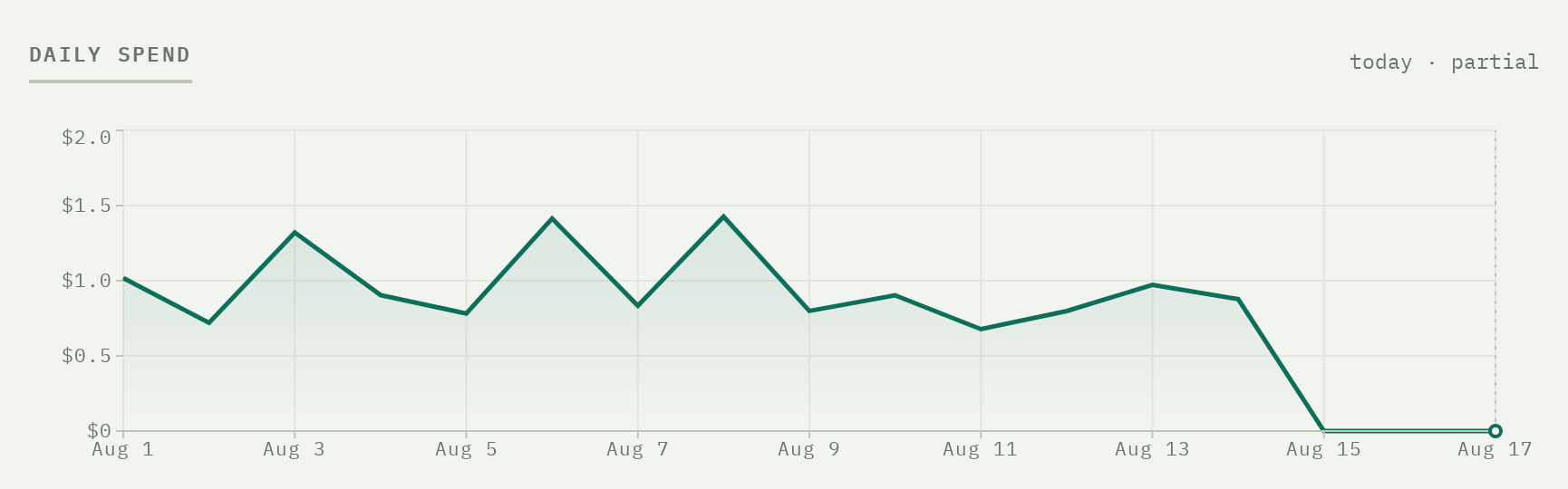
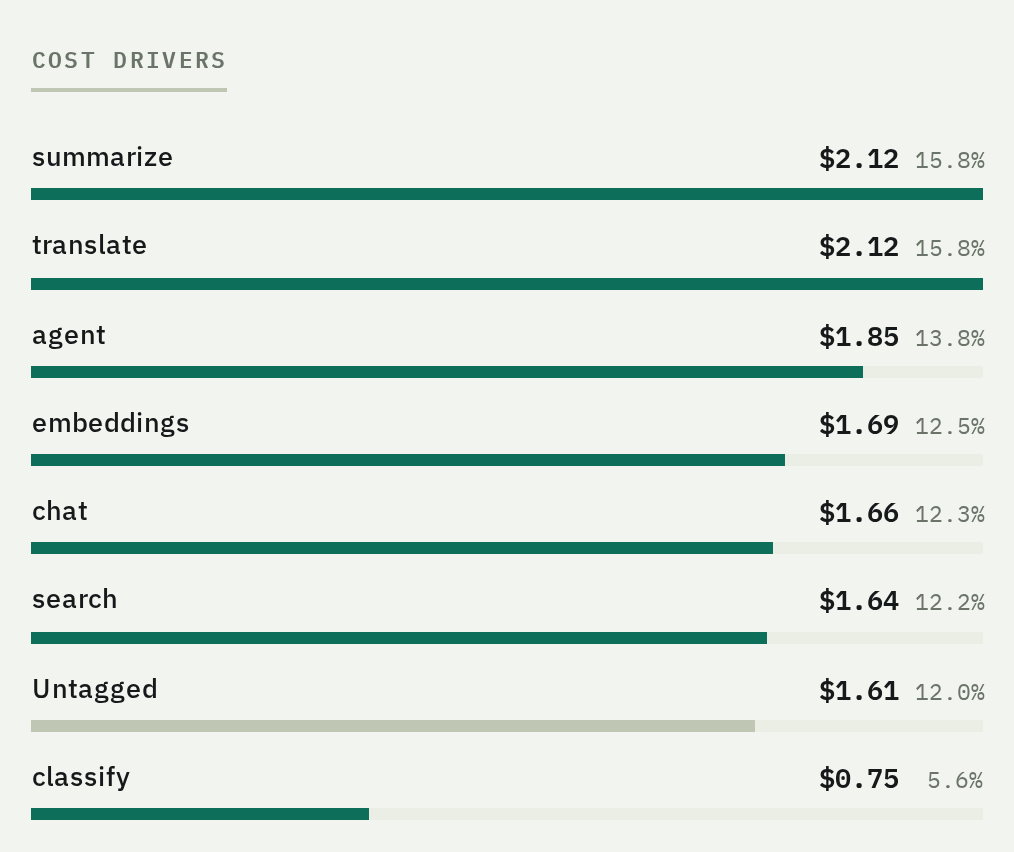
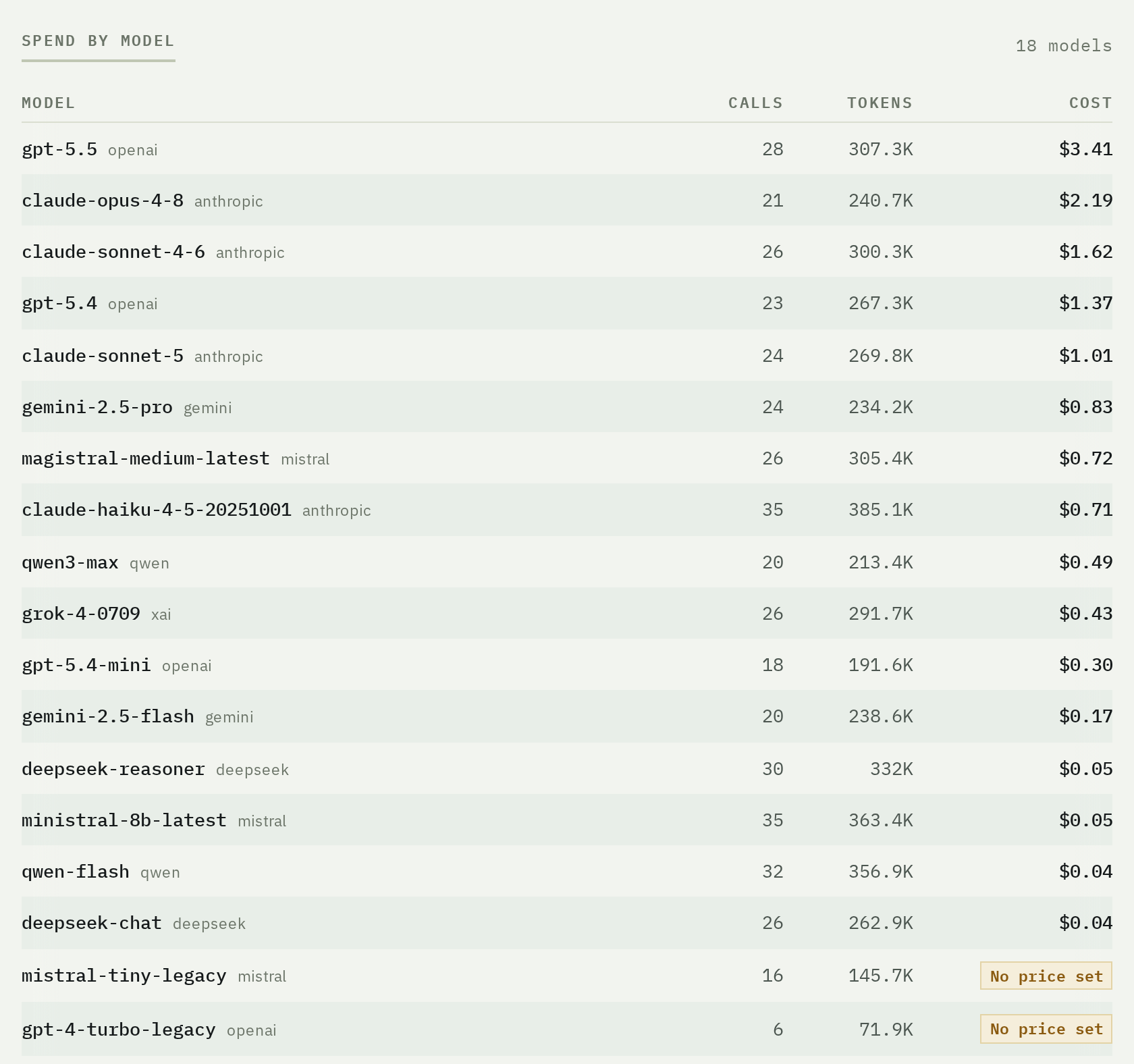
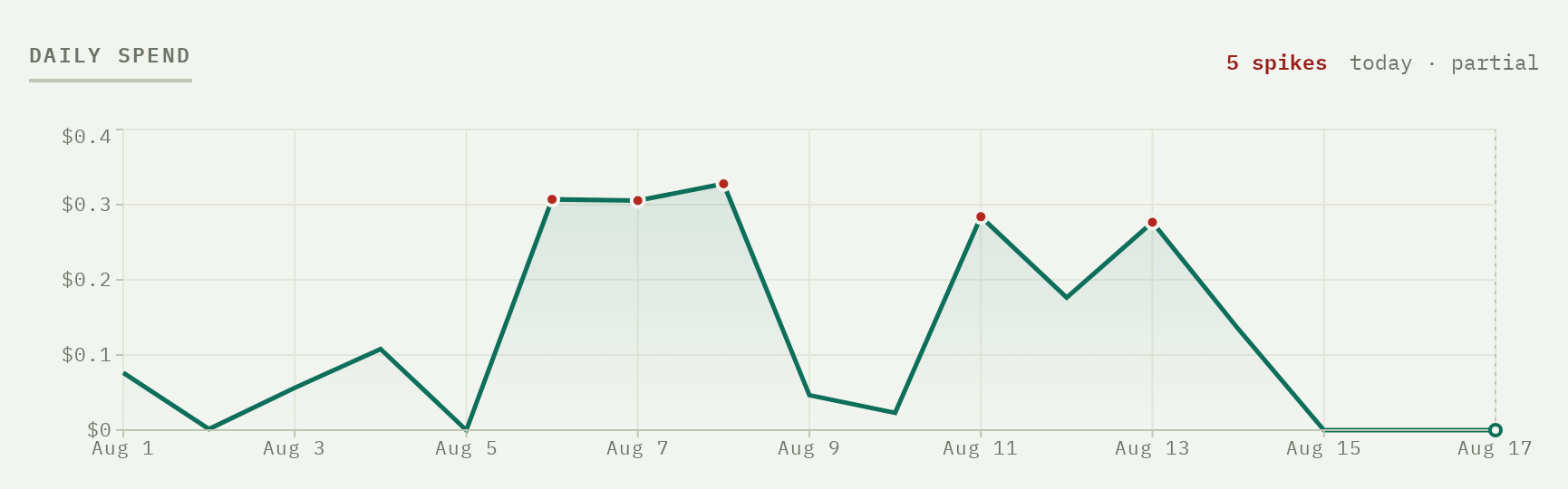
Every call, priced to the micro-cent.
Set TOKLI_INGEST_KEY and every call shows up here
— by day, model and feature. Without the key the wrapper is a silent no-op.
Control
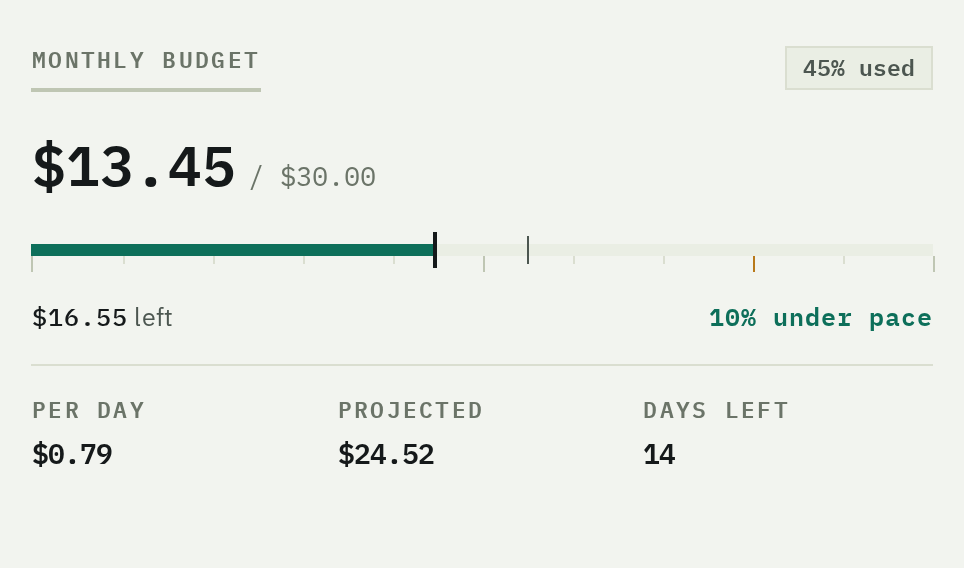
Know before the invoice.
Last event · 3 min ago
Always know it's flowing. The dashboard shows when the last event landed, and warns if ingestion goes quiet.
The bottom line
Your AI bill, explained.
- Setup1 line of code
- Your API keys shared0
- Added latency0 ms
- Price while in early access$0.00
No credit card · Uninstall = delete one line
FAQ
Before you add it to production.
Does tokli see my provider API keys?
No. tokli is report-only: your code calls the provider with your own key, and the SDK reads token usage from responses you already receive. Your keys never leave your app.
Does the SDK add latency to my LLM calls?
No. Usage is reported fire-and-forget after your call completes — tokli never sits in the request path.
What happens if tokli goes down?
Nothing happens to your app. The wrapper fails open: if the ingest key is missing or reporting fails, it's a silent no-op and your calls work exactly as before.
Does it work with streaming responses?
Yes. Every supported provider reports token usage in the final stream event, and the
SDK captures it without touching your stream. A few providers need
stream_options: { include_usage: true } on
streaming calls — each wrapper's docs say whether yours does.
Which providers and models are supported?
OpenAI, Anthropic, Gemini, DeepSeek, xAI, Mistral, Qwen, GLM, Kimi and OpenRouter, with costs computed server-side from a versioned price table. Calls to unknown models are still recorded and flagged — never dropped.
How much does tokli cost?
tokli is free while in early access. No credit card required.